

GPS Satellite Navigator Maintenance and Management
Standardized maintenance process - System self-test diagnostics - In-depth troubleshooting of common problems
First, the routine maintenance of the GPS satellite navigation device
(i) Monthly maintenance guidelines
Please follow these five core steps to complete regular monthly preventive maintenance on your equipment:
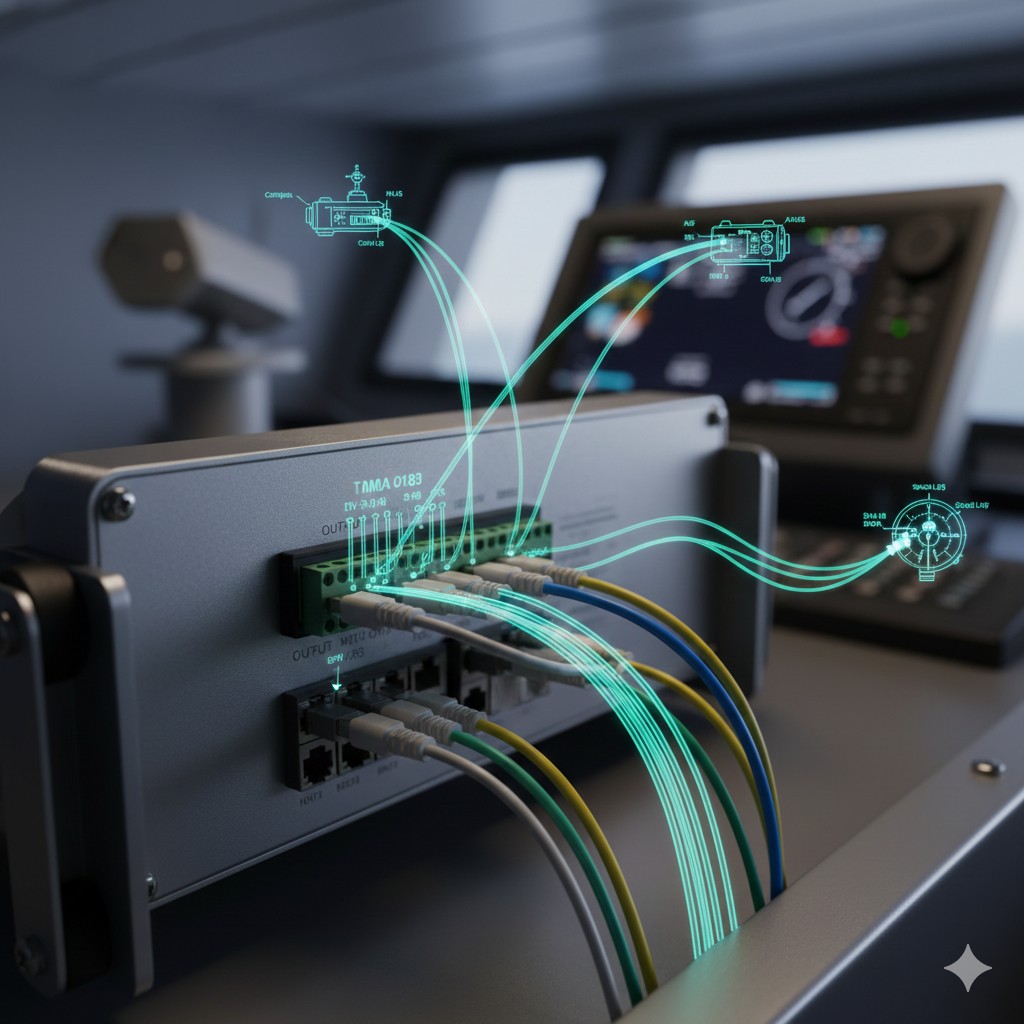
- (1) Cable Inspection: Check the rear cable connections of the navigator for tightness and rust.
- (2) Grounding check: Check ground wire for tightness and rust.
- (3) Power check: Check the power cable connections for tightness and rust.
- (4) Antenna physical inspection: Check antenna connections for tightness and damage.
- (5) Surface cleanliness: Check the keyboard and monitor for dust and rust; if so, remove them with a soft cloth moistened with distilled water.Prohibition of chemical detergents。
(ii) Routine maintenance requirements
Routine maintenance is essential to maintain the normal function of the navigator and is required as follows:
(1) Antenna and bracket firmness: Check the fixing, watertightness and firmness of the antenna cable and bracket. Check the fixing, corrosion and watertightness of the antenna and cable every 3~4 months, and also check whether the bracket of the satellite navigator and sub-display is fixed firmly, and deal with the problem immediately if it is found.
(2) Cleaning and dusting: It is necessary to keep the satellite navigation device clean and tidy, if the satellite navigation device splashes water should be wiped dry in a timely manner, and to keep the vicinity of the satellite navigation device clean in order to minimize the entry of dust into the machine. Regular cleaning and dust removal inside the aircraft is generally required:KGP-912 Guardian Guide (Closed Satellite Navigator)Can be removed every 1 to 2 years;Suction-cooled Satellite NavigatorVacuum cleaner should be used to remove dust from the machine every 3-4 months.
(3) Ventilation to dissipate heat: Check the ventilation gaps at the front and rear of the unit. Satellite navigation equipment should not be hooded when in operation, and ventilation gaps should be left at the front and rear to ensure good ventilation and cooling.
(4) Battery management: Check the internal battery. Regularly check the internal battery according to the instruction manual and replace it when the voltage value is lower than required; if the instrument is turned on for a long period of time, the internal battery should be replaced once every 1~2 years in general.
(5) Continuous self-testing: Complete the self-test of the equipment. If the satellite navigation device is found to be faulty, it is necessary to use the self-test function in the machine to self-test three times in a row to determine the faulty parts and causes, if it is not possible to repair by yourself need to be reported to the repair in a timely manner.
(iii) Requirements for technical specifications after repair
The repaired satellite navigator must strictly meet the following technical requirements before being delivered for use:
(2) After 24 h of continuous power-on, no fault signal is displayed.
(3) Within 24h, the satellite navigation instrument shall receive and process all GPS navigation satellite signals passing over the ship, and the positioning accuracy shall be in accordance with the performance specifications of the machine.
(4) All navigation functions of the machine shall be complete and correct.
(5) The data display on the monitor should be clear and undistorted, with adjustable glow and contrast respectively.
(6) The satnav panel background illumination shall be intact.
Operating Precautions: (1) Before operating the device, read the operating instructions thoroughly to avoid misoperation. (2) Do not disassemble the satellite navigation device before determining the exact fault.
Second, the GPS satellite navigation device of common fault troubleshooting
Self Test is a common troubleshooting method for shipboard GPS navigators. Using the self test program, module faults within the system can be detected in time. Please follow the steps below to diagnose and locate faults in each module of the device.
(i) Hardware Diagnosis and Test Procedure
1. Memory Test
(1) Press the “MENU/ESC” key to open the main menu.
(2) Select [6 Maintenance] → [2 Self Test], as shown in Fig. 2-3-1.
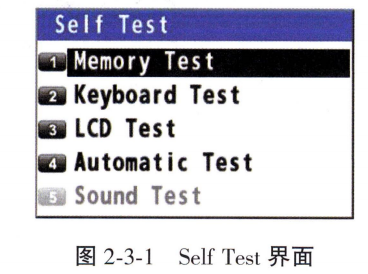 (3) Select [1 Memory Test]. The test result is displayed as “OK”, “NG” (No Good) or “-”. If NG is displayed, please contact your dealer.The test results of Data1~Data4 are checked at the factory using a special connector, and are usually displayed as “-”, as shown in Figure 2-3-2.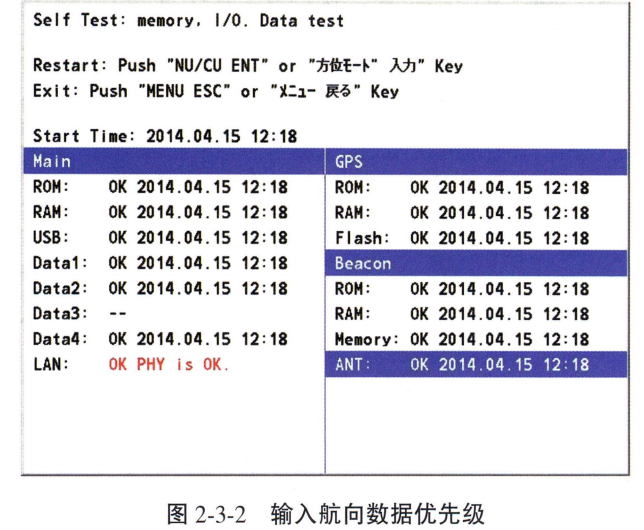
(4) Press the “MENU/ESC” key to close the memory test window.
2. Keyboard Test
(1) Press the “MENU/ESC” key to open the main menu.
(2) Select [6 Maintenance] → [2 Self Test].
(3) Select [2 Keyboard Test]. As shown in Fig. 2-3-3.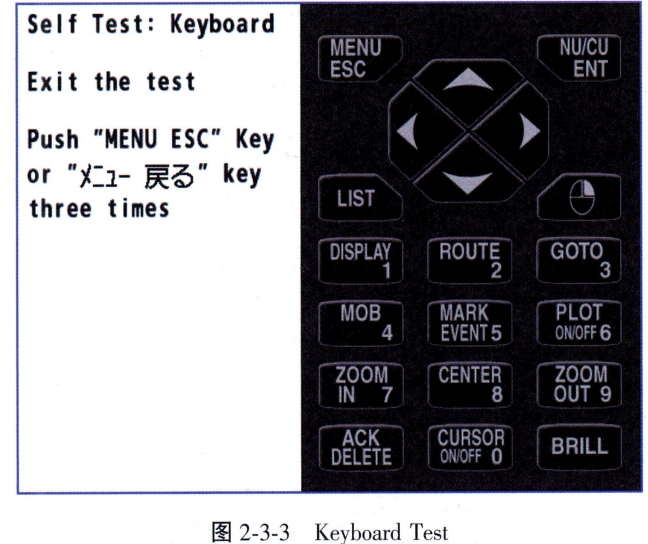
(4) Press each key one by one. If the key is pressed normally, the key will turn blue at the corresponding position on the display.
(5) Press the “MENU/ESC” key three times to close the keyboard test window.
3. LCD Test
(1) Press the “MENU/ESC” key to open the main menu.
(2) Select [6 Maintenance] → [2 Self Test].
(3) Select [3 LCD Test]. As shown in Fig. 2-3-4.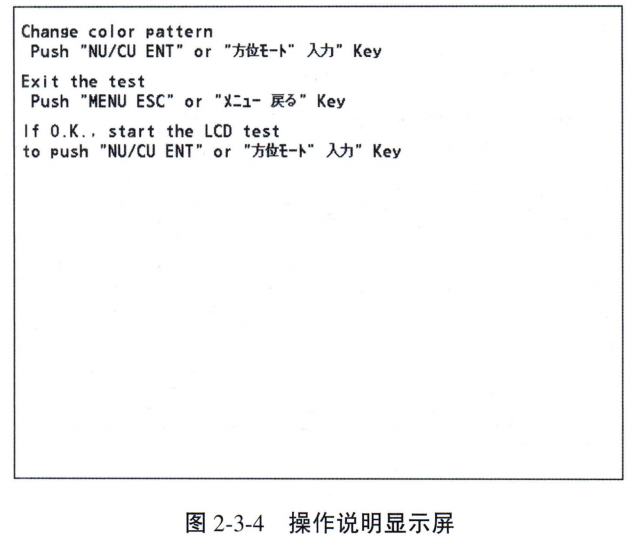
(4) Press the “NU/CU ENT” key. Each time this key is pressed, the LCD mode is changed sequentially (can be canceled at any time by pressing the “MENU/ESC” key). The LCD mode is changed sequentially each time this key is pressed (can be canceled at any time by pressing the "MENU/ESC" key).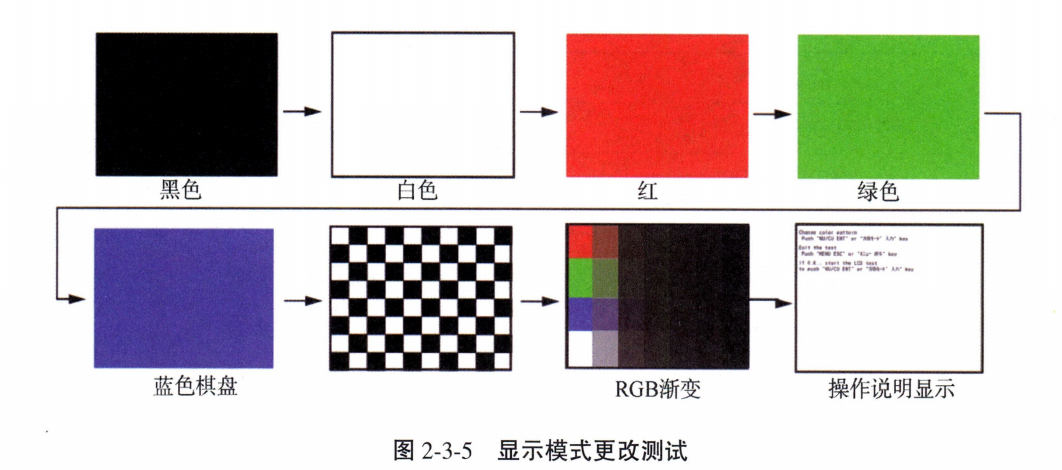
(5) Press the “MENU/ESC” key to close the test mode window.
4. Automatic Test
Memory, keyboard and LCD tests are performed automatically: (1) Press the “MENU/ESC” key to open the main menu. (2) Select [6 Maintenance] → [2 Self Test]. (3) Select [4 Automatic Test]. The GP-170 automatically performs the following tests in order: Memory Test, Keyboard Test, and Display Test C. Note: If the result of checking items other than [Data3] is “NG” or “-”, the test stops. Note: If the result of checking items other than [Data3] is "NG" or "-", the test stops.
(ii) Unable to locate troubleshooting practices
Unable to locate is the most common fault in the daily use of the navigator. Its main causes and troubleshooting steps are as follows:
Failure Causation Analysis:
- The antenna is damaged: The antenna is rusted by moisture or water, or the antenna circuit is faulty.
- Cable issues: The connector is not secure, the plug has fallen out, or the cable is partially damaged.
- Circuit failure: The navigator's own software or hardware is malfunctioning.
- Physical Masking: The antenna was obstructed by a tall structure, causing the signal to be interrupted.
- Out of Scope: Vessel is far from the reference station resulting in an inability to perform DGPS differential positioning (no exclusion necessary).
Troubleshooting Steps:
- Step one: Check if the cable plug is loose and disconnected, antenna connector connection is normal, and recover if there is any abnormality.
- Step two: Check whether the cable is damaged, available test cable replacement access, if it can restore normal positioning, then replace the cable.
- Step Three: If the replacement cable is still invalid, the test antenna can be used to replace the access, and if it returns to normal then replace the antenna.
- Step Four: If it still cannot be recovered after accessing the test antenna, replace the navigator main unit.
(iii) Positioning slowdowns and power failures
1. Reasons for slower positioning: (1) Turning on the machine after a long period of non-use or a large change in position, in a cold/warm starting state (no treatment required). (2) In-flight lithium batteryThe power is exhausted or invalid, the power off can not save the ephemeris information, power on again need to re-receive the data. (3) When the lithium battery voltage is low, the system will issue a battery alarm message, need to be replaced in time.
2. Power supply fuse blown: Usually caused by equipment overcurrent, momentary short-circuit, etc.. The exact cause needs to be identified before replacing the fuse, and if it blows again the equipment needs to be professionally repaired.
Shipboard GPS Satellite Navigator Monthly Self-inspection Record Sheet
Equipment Model: FURUNO GP-170 / KGP-912 (or other)
Date of Inspection: ____ ____ Month ____ Day of Inspection by: ____________
| Serial Number | Inspection items | Status (OK/NG) | Remarks/processing measures |
|---|---|---|---|
| 1 | All cable connections (power, signal) at the rear of the Navigator main unit are tight and free of rust. | ||
| 2 | Ground wire connections are tight and free of rust. | ||
| 3 | Antenna connectors are tight, undamaged, and show no signs of water ingress. | ||
| 4 | Monitor and keyboard surfaces are clean and free of dust and rust (wipe with a soft cloth using distilled water). | ||
| 5 | Whether “SYSTEM OK” is displayed as the result of the Self Test. | ||
| 6 | Is the GPS position status normal (e.g. HDOP 4). | ||
| 7 | Routine maintenance items (every 3-4 months): antenna bracket, cable water tightness, dust removal inside the unit, battery voltage. | N/A | (Indicate date of last inspection) |
Remarks: If the result of the inspection is “NG”, please record the fault phenomenon and the initial steps taken in the column of “Treatment Measures”, and report to the Captain and the Engineer-in-Charge.







 Chinese
  English
  Korean
  Japanese
  Thai
Thai  Arabic
  Spanish
  Russian
  Vietnamese
  Indonesian

