
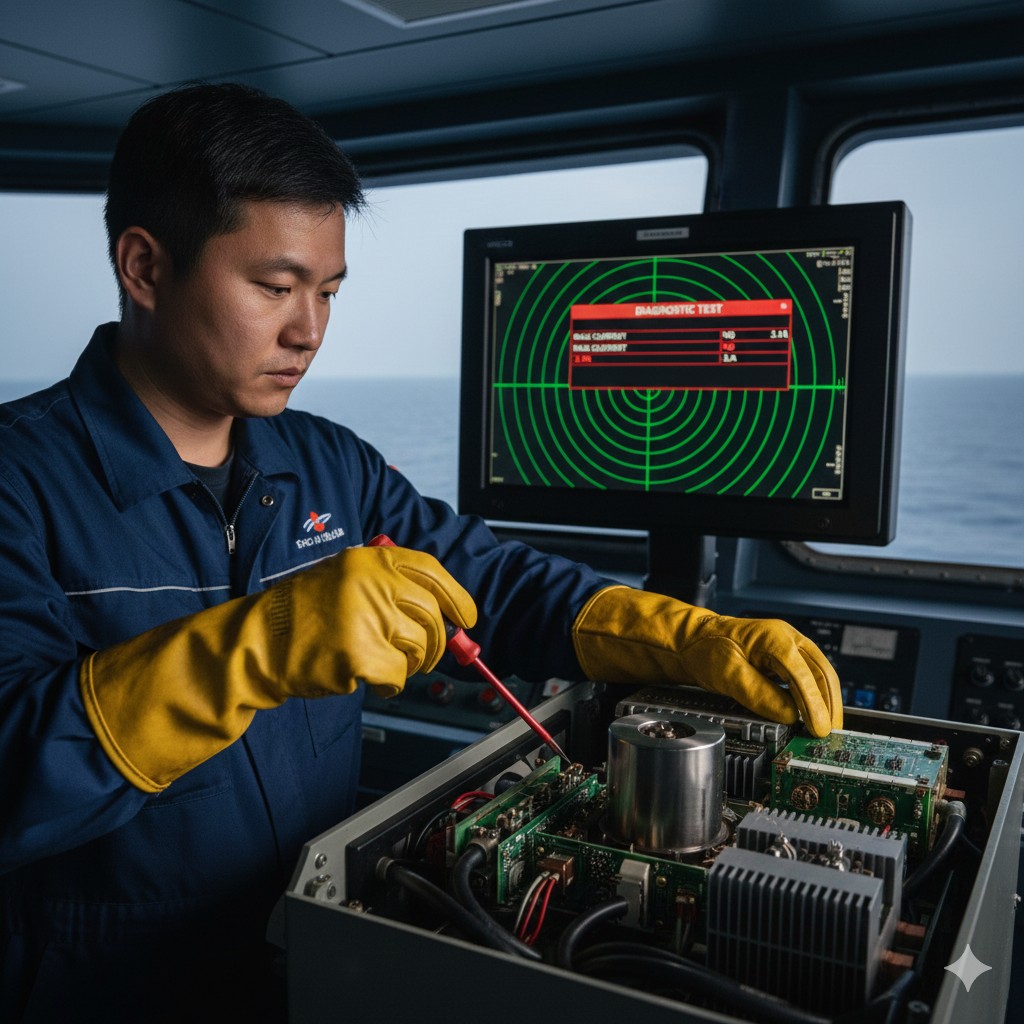
Radar fault judgment and equipment maintenance
I. Radar fault finding and troubleshooting
Radar fault finding and troubleshooting can be roughly divided into the following steps:
(i) Preliminary examination
1. Power check: Make sure that the power switch of the radar system is turned on and that the power supply is stable. Also, check that the power cord is securely connected and that the supply voltage meets the required standards.
2. Antenna inspection: Check that the antenna is able to rotate properly, verify that the antenna cable connections are secure, and that there is no physical damage to the antenna. If the radar antenna fails to rotate, further check that the antenna drive motor is functioning correctly and ensure that the antenna cable connections are correct. Open the antenna shield and double check that the internal connection terminals and jacks are intact. Also, check the rubber gasket on the antenna shield for damage. NOTE: When approaching the antenna guard, avoid touching any cables that may be loose between the guard and the unit.
3. Monitor inspection: Ensure that the monitor is working properly, with moderate display brightness and no visible image distortion or black screen.
(ii) Common failures and solutions
1. No image display
When there is no image display on the radar screen, it can be checked in the following ways:
(2) Check that the antenna is rotated and that the antenna cable is well connected.
(3) Check if the monitor is working properly and try to adjust the display brightness.
(4) Check if the radar is in Standby status, if so, press the “STBY/TX” key to switch to transmit status.
(5) Check whether the magnetron has reached the end of its service life from the self-test result, if the magnetron is near the end of its service life, you need to replace the magnetron. If the magnetron is near the end of its service life, the magnetron should be replaced. The actual life of the magnetron should be referred to the radar manual. Before replacing the magnetron, the maintenance personnel should remove any magnetic objects (e.g. watch). Use a non-magnetic screwdriver to remove and replace the magnetron with a new one. Once the new magnetron is installed, turn on the power and check the magnetron voltage. Complete the “seasoning” process. Note that there is a vacuum inside the magnetron and it should be handled gently.
(6) After placing the radar in the transmitting state, check the magnetron current, compare the test results with the rated value, and record the comparison results. Under normal circumstances, when adjusting the radar range, as the range increases, the magnetron current will also increase the phenomenon. For the checking method of magnetron current, please refer to Section IV “I. Radar fault finding and troubleshooting - (D) Other troubleshooting methods - 1.
(7) Check whether the echo signal transmission cable or cable connector is damaged. If the cable gland needs to be replaced, proceed as follows:
Put the flat washer through the signal cable, put another flat washer through it and cut the exposed part neatly; put the crimp washer, flat washer and clamp ring through the signal cable in turn; put the signal cable into the hole of the antenna mounting bracket and press the flat washer into it firmly; tighten the clamp ring with the fixing bolts and make sure that the bolts are tightened with even force.
2. Blurred or distorted images
When the radar screen image is blurred or distorted, it can be checked in the following ways:
(2) Adjust the Sea Clutter Abatement (A/C SEA) and Rain Clutter Abatement (A/C RAIN) controls to ensure that the target echo is clearly visible.
(3) Check that the antenna is clean and not obstructed by foreign objects.
(4) Check whether the waveguide is cracked (if cracked, replace immediately), check the sealing of the waveguide flange and the waveguide, cable through the deck of the fire, watertight situation.
(5) radar work for half an hour, check whether the tuning indication changes, tuning indication as shown in Figure 1-4-1, tuning voltage from the minimum value to the maximum value of the process of adjustment, tuning indication should be from small to large, and then from large to small, the process should appear two or more obvious great values, and record the results of changes.
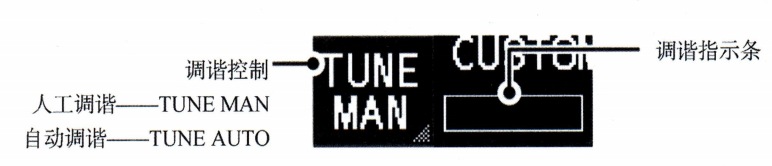 Figure 1-4-1 Tuning Indication
3. Loss of target or erratic tracking
When a radar tracking target is lost or tracking is unstable, it can be checked by the following steps:
(2) Check whether the target is within the effective detection range of the radar and adjust the range and pulse width (Pulse Width).
(3) Check that the target tracking function is properly enabled to ensure that targets are properly captured and tracked.
4. Radar fails to activate or shuts down immediately after activation
When the radar fails to start or shuts off immediately after starting, check it by following the steps below:
(2) Check for blown fuses in the radar system. Fuses at the rear of the processor unit of the display unit protect the equipment from overcurrent and equipment failure. If the unit cannot be turned on, check the fuse first. If the fuse needs to be replaced, first make sure that the same type of fuse is used; using the wrong fuse will damage the equipment.
(3) Check that the cooling system of the radar system is working properly to ensure good heat dissipation.
5. Cursor jumps or moves abnormally
Figure 1-4-2 shows the radar mouse, if the cursor jumps or moves abnormally you can follow the steps below to clean or replace the trackball:
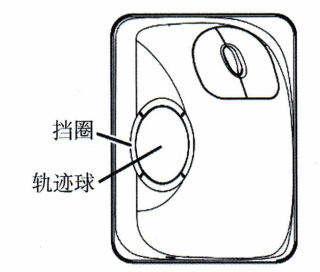 Figure 1-4-2 Radar Mouse
- (1) Turn the retaining ring 45° counterclockwise to unlock it.
- (2) Remove the retaining ring and trackball.
- (3) Clean the trackball with a soft, lint-free cloth, then carefully clean the dust from the ball slot.
- (4) If there is dirt on the rollers, clean the rollers with a cotton swab moistened with isopropyl alcohol.
- (5) Make sure that no lint from the swab remains on the roller.
- (6) Replace trackball and retainer ring, making sure retainer ring is not inserted backwards.
(iii) Analysis of radar fault alarm messages
The radar system will clearly indicate the reason for triggering the alarm. When the alarm tone and message are displayed, the operator can carry out troubleshooting according to the description of the alarm indication and the troubleshooting procedure in the manual, make preliminary judgment on the cause of the fault, report the fault information of the radar to the shipowner in time, contact the equipment service provider, and make relevant records. In addition, the operator can also check the past records of the radar by checking the radar repair and maintenance record book to understand the replacement time of each sub-component of the radar, so as to judge whether the operation of the system is related to these records.
When the radar detects an alarm signal, the display alarm box will continue to show the alarm message and sound the alarm beep. The warning beeps stop when the Alarm Acknowledge button is pressed. The types of radar equipment failure alarms include sensor failure, communication failure, sensor signal loss, etc. The electrical and electronics personnel should focus on the equipment failure alarms. Electrical and electronic personnel should pay attention to the equipment fault alarms, according to the detailed alarm information, step-by-step fault detection and troubleshooting, such as the loss of heading signal alarm, the loss of speed signal alarm, the loss of ship's position signal alarm, the loss of triggering signal alarm, antenna failure alarm, and communication failure alarm, etc. Specific radar fault alarm information can be found in the Alarm Acknowledge key. Refer to the manual of the corresponding radar model for the specific alarm information of the radar.
(iv) Other troubleshooting methods
1. System self-testing
The self-test function of the radar system can test the main circuits of the radar system, such as the control unit and the processor unit, and give the important parameter values of the circuits in the test unit, so as to help the maintenance personnel to judge the faulty parts of the radar.
Here we take Furuno FAR-2××8 series radar as an example to illustrate its system self-test program method and test results. Find the [MAIN MENU]-[9 INITIAL SETTINGS]-[7 TESTS]-[2 DIAGNOSTIC TEST] option in the menu bar of the radar display screen to activate the radar's self-test function. After a few minutes the test results will be displayed as shown in Figure 1-4-3. Press the F1 key three times to display the antenna test results. Press the F1 key to close the test results and complete the test. During the test, the alarm cannot be acknowledged and the buzzer does not sound. It should be noted that during the diagnostic test, the normal image of the radar is temporarily lost. It is recommended that self-tests be performed periodically to ensure proper operation of the radar system.
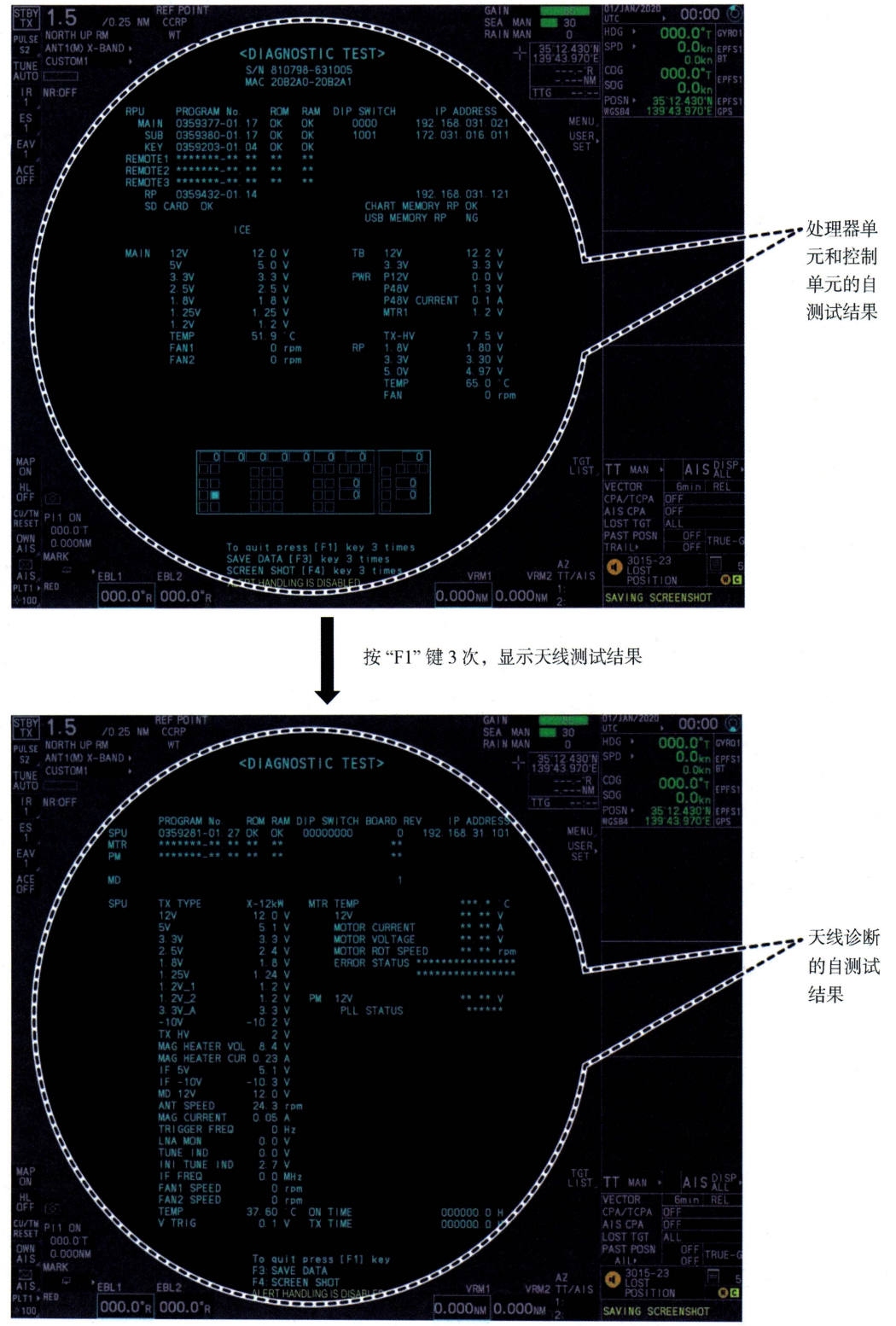 Figure 1-4-3 Furuno Radar Self-Test Results
If the test result shows “OK”, it means it passes; if it shows “NG” (failed), it means that the corresponding component may be faulty and you need to contact your dealer. Figure 1-4-3 Self-test result contains a number of test items, the meaning of some of them is as follows:
2. Performance monitoring
The radar's transmit and receive performance can be checked using the Performance Monitor. The operator can enable the Performance Monitor via the “PM” option in the menu. If the Performance Monitor shows an abnormality, the transmitter, receiver or antenna unit may need to be checked.
The radar performance monitor needs to be calibrated as soon as it is installed. When the radar is transmitting, the operator should enter the radar's installation initialization main menu, select the radar parameter setting, then select the performance monitor gain (Gain) and make adjustments. During the adjustment process, the operator should refer to the radar's operating instructions and observe the PM image changes until the image meets the performance monitor's imaging requirements. If there is any doubt about the radar's performance, the operator can use the performance monitor to judge the radar's working status at any time.
- (1) Set the radar to TX (transmit) mode for 10~30 min of normal operation.
- (2) Select the performance monitor operating range specified in the operating instructions (e.g., 24n mile). If the range is changed manually, the performance monitor will stop working.
- (3) Adjust the gain to a high level, set the receiver to auto-tuning, and turn off the clutter suppression, noise suppression, echo spreading, and echo averaging functions.
- (4)Open the menu and select [PERFORMANCE MONITOR] to activate the performance monitor and display the image.
- (5) The operator observes the radar performance monitoring image and judges the radar transmission power, receiver sensitivity and other performance indicators in conjunction with the operating instructions.
There are many types of coded pattern echoes on a radar performance monitor, but the basic principle is to present a regular coded pattern image (e.g., rings, arcs, feathers, flaps, etc.) on the monitor that is generally distinguishable from the radar's irregular echoes. When the performance monitor is turned on, the operator should select a large number of ranges with a wide pulse width setting to increase the detection time of the AFC and to minimize the interference of radar echo images in complex environments with the performance monitor observations.
Figure 1-4-4 shows the FURUNO FAR-2218 Radar Performance Monitor. When the performance monitor is turned on, the system range is automatically set to 24 NM, and if the radar transmitter and receiver are in normal operating condition, the inner most arcs will appear in the range of 8.0 NM to 19.8 NM. A total of 10 dB of loss in the transmitter and receiver can be observed through the performance monitor. If any degradation in radar performance is detected, the operator should report it to his supervisor and arrange for repair. In addition, after each use of the performance monitor, the operator should turn it off to avoid affecting the safe operation of the radar.
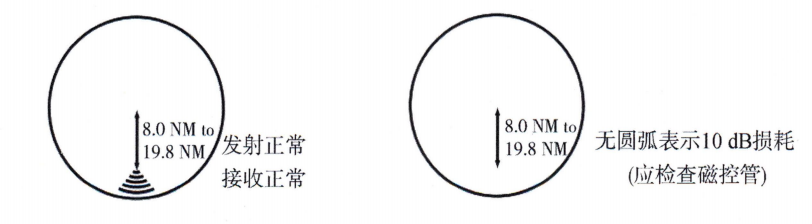 Figure 1-4-4 FURUNO FAR-2218 Radar Performance Monitor Display Image
3. Software failure: In the event of a software failure in the radar system, the operator may first attempt to reboot the system. If the problem is not resolved, it may be necessary to reinstall or upgrade the radar system software.
4. Replacement of components: If parts are found to be damaged or deteriorated, they need to be replaced promptly. Common wear parts include fuses, cables, and antenna components. The battery mounted on the gyrocompass board in the processor unit retains the gyrocompass data in the event of a power failure and has a life expectancy of approximately 5 years. The gyrocompass board battery needs to be replaced when the battery voltage drops and the diagnostic test for this board shows “NG”.
5. Inspection of radar after repair
The content of the inspection after radar repair varies according to the type of fault, but the following points need to be ensured in every acceptance:
- (1) Operational response: the radar responds correctly to the operation of each control knob.
- (2) Image quality: clear radar echo and stable image.
- (3) Error calibration: Failures involving changes in ranging or azimuth measurement errors, after repair, need to confirm that the error adjustment to the performance standards specified range. After repairing the orientation scanning system or replacing the magnetron, it is necessary to verify the accuracy of the measurement of orientation; after replacing the magnetron, it should be reset to the magnetron working time, “seasoned” operation, and verify the magnetron current and the working condition under various pulse widths. After repairing the distance scanning system or changing the length of the signal cable, the distance measurement accuracy should be verified.
- (4) System initialization: Repairs involving system initialization or circuit adjustment should carefully verify sensor information and radar image quality.
Radar maintenance should be recorded in the radar logbook, which usually includes the fault phenomenon, the time of reporting, the repair arrangement, and the working condition of the radar after repair.
II. Radar maintenance plan
For most of the radar printed circuit boards (PCBs) assembled by surface mount technology (SMT), it is difficult to perform component-level troubleshooting in the absence of specialized test equipment. Due to the long-term sea voyage of the ship, the maintenance conditions are restricted, and it is usually difficult to repair the radar PCBs in the field once they fail. Therefore, when a radar PCB fails, the only way to restore the function of the equipment is to replace the whole board.
When a radar malfunction occurs and a repair company is called upon, the operator should provide the repair technician with the details of the radar malfunction, which should generally include the name of the vessel, the model of the equipment, the version of the system software, the ship's stopping information, the ship's agent, the contact person, and as much detail as possible about the malfunction.
Radar maintenance is essential to maintain good performance, and a maintenance program can be developed according to the different maintenance contents. The participants, working time, content of work, tools used, types and quantity of materials consumed, etc. involved in the maintenance work should be recorded and made a part of the shift handover work of the electrical and electronics officer or the second mate. The shipowner shall provide spare parts for maintenance. The ship owner or ship management company is obliged to supervise and audit the completion of the daily maintenance program of radar and make suggestions for improvement. In conclusion, when carrying out maintenance, repair and overhaul of radar equipment, personal safety should be regarded as the first priority.









 Chinese
  English
  Korean
  Japanese
  Thai
Thai  Arabic
  Spanish
  Russian
  Vietnamese
  Indonesian

